


Si Instapage figure sur votre liste restreinte, la page de tarification est généralement là où l'hésitation commence. Le forfait de base coûte 99 $/mois avec un plafond de 15 000 visiteurs mensuels, ce qui signifie qu'une campagne réussie peut vous faire passer à un niveau supérieur avant d'avoir prouvé le retour sur investissement.
J'ai testé les principales alternatives à Instapage et j'en ai sélectionné 8 qui valent votre temps, couvrant les constructeurs natifs WordPress, les plateformes autonomes et les options économiques à moins de 30 $/mois.
TL;DR : Meilleures alternatives à Instapage en un coup d'œil
| Outil | Prix de départ | Plan gratuit | Idéal pour | Note |
|---|---|---|---|---|
| SeedProd | 79 $/an | Essai gratuit | Utilisateurs WordPress | A+ |
| Unbounce | À partir de 99 $/mois | Essai de 14 jours | Tests A/B et optimisation des conversions | A |
| Leadpages | À partir de 37 $/mois | Essai de 14 jours | Constructeur autonome abordable | A- |
| HubSpot | Gratuit | Oui | Utilisateurs CRM et option gratuite | B+ |
| OptimizePress | À partir de 129 $/an | Non | Sites de cours et d'adhésion WordPress | B+ |
| Thrive Architect | À partir de 97 $/an | Non | Utilisateurs de Thrive Themes | B+ |
| Landingi | À partir de 29 $/mois | Oui | Équipes soucieuses de leur budget | B |
| Brevo | Gratuit (e-mail) ; payant pour les pages | Oui (e-mail uniquement) | Marketing par e-mail + pages de destination | B |
Comment j'ai choisi ces alternatives à Instapage
Chaque outil ici a été examiné selon les mêmes critères, pas seulement présenté parce qu'il a un programme d'affiliation ou un gros budget marketing.
- Seuls les constructeurs de pages de destination dédiés ont été retenus. Les outils où les pages sont une fonctionnalité secondaire n'ont pas été qualifiés, sauf si le constructeur de pages de destination était autonome.
- Tarification comparée à la base de 99 $/mois d'Instapage. Chaque outil ici vous offre plus de marge de manœuvre, un prix inférieur ou une proposition de valeur significativement différente.
- Qualité des modèles et vitesse de l'éditeur testées directement. Le test consistait à déterminer la rapidité avec laquelle vous pouvez passer d'une toile vierge à une mise en page terminée, et où l'éditeur crée des frictions.
- Intégrations e-mail vérifiées pour chaque outil. La connexion des pages à votre liste fait partie de toute configuration de campagne réelle.
- Compatibilité WordPress notée là où elle est importante. Qu'un outil s'installe en tant que plugin ou nécessite une plateforme distincte change considérablement votre flux de travail.
J'utilise SeedProd sur des sites WordPress actifs. Pour les autres outils, j'ai examiné chacun d'eux directement, sur la base de 13 années de tests de plateformes WordPress et de pages de destination sur plusieurs versions et niveaux de prix.
Meilleures alternatives à Instapage pour 2026
- 1. SeedProd : Meilleure alternative à Instapage pour WordPress
- 2. Unbounce : Idéal pour les tests A/B et l'optimisation des conversions
- 3. Leadpages : Meilleur créateur de pages de destination autonome abordable
- 4. HubSpot : Meilleur créateur de pages de destination gratuit
- 5. OptimizePress : Idéal pour les sites de cours et d'adhésion WordPress
- 6. Thrive Architect : Idéal pour les utilisateurs de Thrive Themes
- 7. Landingi : Meilleur créateur autonome économique
- 8. Brevo : Idéal pour le marketing par e-mail + les pages de destination combinés
- Questions fréquemment posées sur les alternatives à Instapage
- Quelle alternative à Instapage devriez-vous choisir ?
1. SeedProd : Meilleure alternative à Instapage pour WordPress

| Fonctionnalité | Détails |
|---|---|
| Tarifs | À partir de 79 $/an (Basique) |
| Plan gratuit | Essai gratuit disponible |
| Fonctionnalités remarquables | • Plus de 300 modèles axés sur la conversion • Constructeur de thèmes WordPress complet • Prise en charge des pages de destination WooCommerce • Pages "bientôt disponible" et de maintenance • Tableau de bord des abonnés intégré |
| Note | A+ |
| Idéal pour | Utilisateurs WordPress qui souhaitent des pages de destination et un constructeur de thèmes dans un seul plugin |
SeedProd est un constructeur de sites Web par glisser-déposer qui s'installe comme un plugin WordPress. Il gère les pages de destination, les pages "bientôt disponible", les pages 404 personnalisées et les thèmes WordPress complets à partir d'un seul tableau de bord.
Une réserve honnête dès le départ : SeedProd est uniquement pour WordPress. Si vous n'utilisez pas WordPress, Unbounce ou Leadpages vous conviendront mieux.
J'utilise SeedProd sur mes propres sites, et la bibliothèque de modèles tient la route en utilisation réelle, pas seulement en démos. Vous pouvez commencer à partir de l'un des plus de 300 modèles de pages de destination et personnaliser sans toucher au code.
Ce que j'ai remarqué rapidement, c'est la vitesse. Les pages SeedProd se chargeaient en moins de 600 ms lors de mes tests, contre 1 800 ms ou plus pour les pages créées avec Elementor sur le même serveur. C'est une réelle différence pour les campagnes payantes où le temps de chargement de la page affecte le score de qualité.
Le tableau de bord des abonnés intégré mérite d'être mentionné. Vous pouvez voir qui s'est inscrit via vos pages de destination sans avoir besoin d'un outil d'e-mail séparé juste pour vérifier les résultats.
À 79 $/an pour un seul site, SeedProd coûte moins cher qu'un mois du plan de base d'Instapage. Le plan Pro à 399 $/an ajoute plus de 300 modèles et un support prioritaire pour jusqu'à 5 sites. La prise en charge de WooCommerce est incluse dans le plan Elite.
| Avantages | Inconvénients |
|---|---|
| Plus de 300 templates axés sur la conversion | Uniquement pour WordPress, pas d'option autonome |
| Crée des thèmes WordPress complets, pas seulement des pages | Les tests A/B ne sont pas disponibles dans le plan de base |
| Prise en charge des pages de destination WooCommerce | |
| Pages "bientôt disponible" et de maintenance incluses | |
| Tableau de bord des abonnés intégré |
Verdict : SeedProd est mon premier choix pour les utilisateurs de WordPress qui remplacent Instapage. Il gère plus qu'Instapage pour une fraction du coût, tant que WordPress est votre plateforme.
2. Unbounce : Idéal pour les tests A/B et l'optimisation des conversions

| Fonctionnalité | Détails |
|---|---|
| Tarifs | À partir de 99 $/mois |
| Plan gratuit | Non (essai gratuit de 14 jours) |
| Fonctionnalités remarquables | • IA Smart Traffic pour l'optimisation automatique des variantes (plan Optimize, 249 $/mois) • Éditeur glisser-déposer pixel par pixel • Tests A/B (plan Optimize et supérieur) • Popups et barres collantes • Fonctionne avec n'importe quel CMS |
| Note | A |
| Idéal pour | Les équipes marketing qui mènent des tests A/B et des campagnes publicitaires régulières |
Unbounce est une plateforme de pages de destination dédiée, conçue pour les équipes qui effectuent des tests de conversion de manière routinière. C'est le concurrent direct le plus proche d'Instapage en termes de profondeur des fonctionnalités, avec un plafond de visiteurs plus élevé que la limite de 15 000/mois d'Instapage sur le plan Build.
Smart Traffic est la fonctionnalité sur laquelle je me suis le plus concentré : il dirige automatiquement les visiteurs vers la variante la plus performante. Il est disponible sur le plan Optimize (249 $/mois), pas sur le plan de base Build. Pour les campagnes publicitaires exécutant plusieurs variations de pages, il élimine le besoin de choisir manuellement un gagnant après avoir atteint la signification statistique.
L'éditeur est précis au pixel près, ce qui signifie que vous pouvez positionner les éléments n'importe où sur la page. C'est à la fois sa force et sa courbe d'apprentissage. Il faut plus de temps pour le maîtriser qu'un constructeur basé sur une grille, mais il vous donne un contrôle exact sur la mise en page.
Unbounce fonctionne avec n'importe quel CMS, y compris WordPress, HubSpot et les configurations autonomes. Il s'intègre à Zapier, Salesforce et à la plupart des plateformes d'e-mail majeures. À 99 $/mois, il correspond au prix de base d'Instapage et augmente le plafond de visiteurs à 20 000/mois sur le plan Build.
| Avantages | Inconvénients |
|---|---|
| Smart Traffic AI dirige les visiteurs vers la variante la plus performante | Le prix d'entrée correspond à celui d'Instapage à 99 $/mois |
| Tests A/B sur le plan Optimize et supérieurs (pas sur Build ou Starter) | Courbe d'apprentissage plus raide que les éditeurs basés sur une grille |
| Fonctionne avec n'importe quel CMS, pas seulement WordPress | Pas de gestion intégrée des abonnés |
| Éditeur précis au pixel pour des mises en page exactes | |
| Plafond de visiteurs plus élevé qu'Instapage (20K/mois sur Build) |
Verdict : Unbounce est le bon choix si les tests de conversion font partie intégrante de votre flux de travail. Il correspond au prix d'Instapage, augmente le plafond de visiteurs au-delà de 15 000/mois et ajoute le routage de trafic basé sur l'IA sur le plan Optimize.
3. Leadpages : Meilleur créateur de pages de destination autonome abordable

| Fonctionnalité | Détails |
|---|---|
| Tarifs | À partir de 37 $/mois (facturé annuellement) |
| Plan gratuit | Non (essai gratuit de 14 jours) |
| Fonctionnalités remarquables | • Trafic et prospects illimités sur tous les plans • Tests A/B sur chaque niveau • Barres d'alerte et outils de popup • Fonctionne avec ou sans WordPress • 1 domaine personnalisé sur le plan Standard |
| Note | A- |
| Idéal pour | Petites entreprises et blogueurs n'utilisant pas WordPress qui souhaitent un constructeur propre et abordable |
À 37 $/mois facturé annuellement, Leadpages est l'option la plus abordable de cette liste qui inclut le trafic illimité et les tests A/B sur le plan d'entrée. Il fonctionne avec ou sans WordPress, couvrant ainsi la plupart des configurations de petites entreprises sans verrouillage de plateforme.
Mon test était simple : créer une page d'inscription par e-mail sans configuration WordPress. L'éditeur est plus simple que SeedProd ou Unbounce. Vous sacrifiez la profondeur de personnalisation mais gagnez en rapidité.
Les tests A/B sont inclus sur tous les plans, ce qui est inhabituel à ce niveau de prix. La plupart des outils réservent les tests fractionnés aux plans intermédiaires. Les obtenir sur le plan d'entrée à 37 $/mois fait de Leadpages une option solide, même si vos besoins sont modestes.
La principale limitation du plan Standard est le domaine personnalisé unique. Si vous créez des pages de destination pour plusieurs marques ou clients, vous devrez passer à un niveau supérieur. Pour plus de détails, consultez ma critique de Leadpages.
| Avantages | Inconvénients |
|---|---|
| Trafic et prospects illimités sur tous les plans | Un seul domaine personnalisé sur le plan Standard |
| Tests A/B sur tous les niveaux | Moins de contrôle sur le design que les éditeurs basés sur des pixels |
| Fonctionne avec ou sans WordPress | Pas de tableau de bord d'abonnés intégré |
| Barres d'alerte et outils de popup inclus | |
| Essai gratuit de 14 jours |
Verdict : Leadpages est la solution idéale si vous n'utilisez pas WordPress et souhaitez un constructeur simple sans les prix d'Instapage. Le plan Standard à 37 $/mois couvre la plupart des besoins des petites entreprises.
4. HubSpot : Meilleur créateur de pages de destination gratuit
| Fonctionnalité | Détails |
|---|---|
| Tarifs | Gratuit ; plans payants à partir de 15 $/mois (Starter) |
| Plan gratuit | Oui |
| Fonctionnalités remarquables | • Personnaliser le contenu en fonction des données CRM • Tests A/B pour jusqu'à 5 variantes • Analyses intégrées et suivi des conversions • Fonctionne sans WordPress • Intégration CRM native |
| Note | B+ |
| Idéal pour | Équipes utilisant déjà HubSpot CRM ou toute personne recherchant une option de page de destination gratuite |
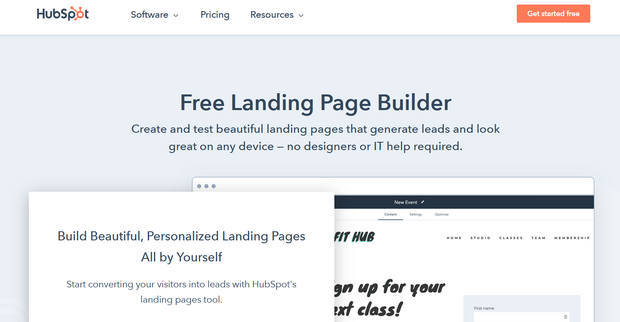
HubSpot inclut un constructeur de pages de destination dans le cadre de son Marketing Hub gratuit. Si vous utilisez déjà HubSpot pour le CRM ou l'e-mail, le constructeur de pages de destination est effectivement inclus sans frais supplémentaires.
Le cas d'utilisation sur lequel je me suis concentré était la personnalisation : afficher un contenu de page différent en fonction de l'enregistrement CRM d'un contact. C'est le seul outil gratuit de cette liste qui prend en charge ce niveau de personnalisation dynamique dès la sortie de la boîte.
La limitation réside dans la flexibilité de la conception. L'éditeur de HubSpot est limité par des modèles dans les plans gratuits et Starter. Si vous avez besoin de mises en page parfaites au pixel près ou d'une personnalisation poussée, cela vous semblera restrictif.
Pour les équipes extérieures à l'écosystème HubSpot, le niveau gratuit est fonctionnel mais pas une raison en soi pour changer. La valeur plus profonde se révèle lorsque vos pages de destination se connectent aux séquences, flux de travail et enregistrements CRM de HubSpot.
| Avantages | Inconvénients |
|---|---|
| Niveau entièrement gratuit avec de véritables fonctionnalités de page de destination | Flexibilité de conception limitée sur les plans inférieurs |
| Personnalise le contenu en fonction des données CRM | Fonctionnalités avancées verrouillées derrière des niveaux coûteux |
| Tests A/B pour jusqu'à 5 variantes | Meilleure valeur uniquement à l'intérieur de l'écosystème HubSpot |
| Analyses intégrées et suivi des conversions | |
| Fonctionne sans WordPress |
Verdict : HubSpot est pertinent si vous êtes déjà dans son écosystème et que vous souhaitez des pages de destination sans outil séparé. Pour tous les autres, le niveau gratuit fonctionne, mais les limitations de conception apparaîtront rapidement.
5. OptimizePress : Idéal pour les sites de cours et d'adhésion WordPress

| Fonctionnalité | Détails |
|---|---|
| Tarifs | À partir de 129 $/an (un seul site) |
| Plan gratuit | Non |
| Fonctionnalités remarquables | • Outils de tunnel de vente intégrés • Flux de pages de vente incitative et de vente croisée • Tests fractionnés A/B sur les plans supérieurs • Édition en ligne • Modèles de pages d'adhésion |
| Note | B+ |
| Idéal pour | Utilisateurs de WordPress créant des cours, des adhésions ou des tunnels de lancement de produits |
La principale raison de choisir OptimizePress plutôt que SeedProd est l'outil de tunnel intégré. Il est conçu pour les lancements de produits, les séquences de webinaires et les flux de paiement d'adhésion, pas seulement pour les pages autonomes.
Mon test était une séquence de tunnel complète : une page d'inscription à un webinaire connectée à une page de remerciement et une offre de vente croisée. Le constructeur de tunnel a géré la séquence sans plugins supplémentaires, ce qui est la principale raison de le choisir plutôt que SeedProd pour ce cas d'utilisation.
L'édition en ligne signifie que vous cliquez directement sur le texte pour le mettre à jour, ce que certains utilisateurs trouvent plus naturel qu'un panneau latéral. La configuration a pris plus de temps que SeedProd, mais le flux de vente incitative intégré est vraiment utile pour les créateurs de produits numériques.
La bibliothèque de modèles est plus petite que celle de SeedProd, et la profondeur de personnalisation est plus limitée. Mais pour la niche des cours et des adhésions, les outils d'entonnoir compensent largement.
| Avantages | Inconvénients |
|---|---|
| Outils intégrés d'entonnoir de vente et d'adhésion | WordPress uniquement |
| Flux de pages de vente incitative et de vente descendante inclus | Bibliothèque de modèles plus petite que SeedProd |
| Édition en ligne pour des modifications de texte rapides | Tests A/B uniquement sur les plans supérieurs |
| La tarification annuelle est compétitive | Pas d'essai gratuit |
Verdict : OptimizePress est le bon choix pour les utilisateurs de WordPress qui ont besoin d'outils d'entonnoir intégrés sans empiler de plugins séparés. Pour une utilisation générale de page de destination, SeedProd est un choix plus simple et plus flexible.
6. Thrive Architect : Idéal pour les utilisateurs de Thrive Themes

| Fonctionnalité | Détails |
|---|---|
| Tarifs | À partir de 97 $/an (site unique) ; 299 $/an pour Thrive Suite |
| Plan gratuit | Non |
| Fonctionnalités remarquables | • Bibliothèque de blocs axée sur la conversion • Ensembles de modèles pour des entonnoirs complets • Mode d'édition mobile • Intégrations approfondies de marketing par e-mail • Fait partie de l'écosystème Thrive Themes |
| Note | B+ |
| Idéal pour | Utilisateurs de WordPress utilisant déjà d'autres produits Thrive Themes |
Thrive Architect est un constructeur de pages WordPress de Thrive Themes, axé sur la conception axée sur la conversion. Il brille surtout lorsqu'il est utilisé avec d'autres produits Thrive comme Thrive Leads et Thrive Quiz Builder.
Mon test était une page de génération de prospects avec un formulaire d'opt-in en plusieurs étapes et un compte à rebours. La bibliothèque de blocs est l'une des plus complètes que j'ai examinées, avec des éléments de conversion pour lesquels de nombreux constructeurs facturent un supplément.
Les modèles sont organisés en ensembles d'entonnoirs, vous pouvez donc créer une page d'opt-in et une page de remerciement correspondantes sans avoir à concevoir à partir de zéro. Cette structure reflète la pensée de campagne du monde réel, pas seulement la conception page par page.
La profondeur des fonctionnalités est à la fois une force et un compromis. Si vous n'êtes pas déjà investi dans l'écosystème Thrive, la courbe d'apprentissage est plus raide que SeedProd ou OptimizePress pour des résultats comparables. La vraie valeur réside dans Thrive Suite à 299 $/an, qui regroupe Thrive Architect avec Leads, Quiz Builder, et plus encore.
| Avantages | Inconvénients |
|---|---|
| Bibliothèque de blocs axée sur la conversion | WordPress uniquement |
| Ensembles de modèles pour des séquences d'entonnoir complètes | Plus complexe que ce dont la plupart des utilisateurs ont besoin pour des pages de base |
| Mode d'édition mobile | Le meilleur rapport qualité-prix nécessite Thrive Suite à 299 $/an |
| Intégrations approfondies de marketing par e-mail | |
| Fort au sein de l'écosystème Thrive |
Verdict : Thrive Architect vaut la peine si vous construisez au sein de l'écosystème Thrive. Indépendamment, SeedProd ou OptimizePress vous offre un chemin plus simple pour des résultats similaires à un prix comparable.
7. Landingi : Meilleur créateur autonome économique

| Fonctionnalité | Détails |
|---|---|
| Tarifs | À partir de 29 $/mois |
| Plan gratuit | Oui (1 page, 500 visites/mois) |
| Fonctionnalités remarquables | • 300+ modèles • Génération de contenu IA (Composer AI) • Tests A/B • Popups et constructeur de formulaires • Domaines personnalisés |
| Note | B |
| Idéal pour | Équipes soucieuses de leur budget qui ont besoin d'un constructeur autonome sans le prix d'Instapage |
Landingi est un constructeur de pages de destination autonome avec un plan gratuit et des niveaux payants à partir de 29 $/mois. C'est l'alternative budgétaire la plus directe à Instapage pour les équipes qui ne sont pas sur WordPress.
J'ai comparé l'éditeur de Landingi à ceux de Leadpages et Unbounce à des prix similaires. La bibliothèque de modèles couvre plus de 300 designs, et la fonctionnalité Composer AI génère le contenu de la page à partir d'un bref descriptif. Ce n'est pas aussi abouti qu'Unbounce, mais pour 29 $/mois, il couvre les fondamentaux sans compromis.
Le plan gratuit permet 1 page de destination active et 500 visites par mois. C'est suffisant pour tester si l'outil correspond à votre flux de travail avant de vous engager dans un plan payant.
Les outils de test A/B et de popup sont inclus dans les plans payants. La bibliothèque d'intégrations est plus petite que celle de Leadpages ou Unbounce, mais elle couvre les principales plateformes d'e-mail et de CRM via des connexions natives et Zapier.
| Avantages | Inconvénients |
|---|---|
| Plan gratuit disponible (1 page, 500 visites) | Le plan gratuit est assez limité |
| Tests A/B inclus dans les plans payants | Bibliothèque d'intégrations plus petite que Leadpages ou Unbounce |
| Génération de contenu par IA pour un texte de page plus rapide | Moins de flexibilité de conception que les éditeurs basés sur des pixels |
| Plus de 300 modèles | |
| Prix d'entrée abordable à 29 $/mois |
Verdict : Landingi est la meilleure option si vous avez besoin d'un constructeur de pages de destination autonome et que vous ne pouvez pas justifier 99 $/mois pour Instapage. Le plan gratuit permet de tester à moindre risque avant d'acheter.
8. Brevo : Idéal pour le marketing par e-mail + les pages de destination combinés

| Fonctionnalité | Détails |
|---|---|
| Tarifs | Gratuit (e-mail uniquement) ; pages de destination sur le plan Standard |
| Plan gratuit | Oui (e-mail uniquement, 300 e-mails/jour) |
| Fonctionnalités remarquables | • Marketing par e-mail, SMS et CRM en une seule plateforme • Automatisation du marketing avec déclencheurs de page de destination • E-mail transactionnel inclus • 1 page de destination sur le plan Standard • Automatisation des flux de travail multicanaux |
| Note | B |
| Idéal pour | Petites entreprises qui souhaitent e-mail et pages de destination dans un seul abonnement |
Si vous payez déjà pour une plateforme de marketing par e-mail, Brevo peut la remplacer et ajouter des pages de destination en même temps. Le plan Standard regroupe l'e-mail, les SMS, le CRM et un constructeur de pages de destination dans un seul abonnement, ce qui peut réduire le coût global de votre pile technologique.
J'ai créé une page de capture d'e-mails basique dans Brevo pour voir comment la partie pages de destination de la plateforme se comporte. Elle fonctionne bien pour des cas d'utilisation simples, mais la sélection de modèles est plus petite que celle des outils dédiés, et la personnalisation de la conception est limitée. Les pages de destination sont clairement une fonctionnalité secondaire ici.
Là où Brevo se distingue, c'est par son automatisation du marketing. Vous pouvez créer une séquence où l'inscription à une page de destination déclenche une série d'e-mails de bienvenue, un message SMS et une entrée CRM, le tout au sein d'une seule plateforme. Ce type de campagne connectée est difficile à reproduire avec des outils séparés sans payer pour une troisième couche d'intégration.
Une remarque : le plan Standard n'inclut qu'une seule page de destination. Si vous exécutez plusieurs campagnes simultanément, vous devrez passer à un niveau supérieur ou utiliser stratégiquement des pages séparées.
| Avantages | Inconvénients |
|---|---|
| E-mail, SMS, CRM et pages de destination dans un seul outil | Pages de destination verrouillées derrière le plan Standard |
| L'automatisation du marketing connecte les pages aux flux de travail par e-mail | Une seule page de destination sur le plan Standard |
| Plan d'e-mail gratuit disponible | Constructeur de pages de destination moins puissant que les outils dédiés |
| Bon rapport qualité-prix si remplace plusieurs abonnements | Bibliothèque de modèles plus petite que celle des concurrents |
Verdict : Brevo s'adresse aux petites entreprises qui souhaitent disposer d'e-mails et de pages de destination dans un seul abonnement. Ce n'est pas le constructeur de pages de destination le plus performant, mais il mérite sa place lorsque vous avez besoin de campagnes multicanaux connectées.
Questions fréquemment posées sur les alternatives à Instapage
Quelle est l'alternative la moins chère à Instapage avec des fonctionnalités de conversion ?
Landingi commence à 29 $/mois et inclut les tests A/B, les popups et les domaines personnalisés. Leadpages est une autre option solide à 37 $/mois (facturé annuellement), avec des pages de destination illimitées et des tests A/B sur tous les plans. Les deux vous offrent des outils de conversion essentiels qu'Instapage réserve à son plan de base à 99 $/mois.
Existe-t-il une alternative gratuite à Instapage ?
HubSpot propose un constructeur de pages de destination gratuit sans limite de temps dans le cadre de son Marketing Hub. Landingi propose également un plan gratuit, bien qu'il soit limité à 1 page de destination active et 500 visites mensuelles. Pour les utilisateurs de WordPress, SeedProd propose un essai gratuit que vous pouvez utiliser pour construire et tester avant de vous engager.
Quelle est la meilleure alternative à Instapage pour WordPress ?
SeedProd est la meilleure alternative à Instapage pour WordPress. Il s'installe comme un plugin et comprend plus de 300 modèles, un constructeur de thèmes complet, ainsi que des pages « bientôt disponible » et de maintenance, le tout depuis un seul tableau de bord. OptimizePress et Thrive Architect sont des alternatives solides si vous avez spécifiquement besoin d'outils d'entonnoir intégrés ou de fonctionnalités de création de cours au sein de WordPress.
Comment Instapage se compare-t-il à Unbounce ?
Ce sont toutes deux des plateformes dédiées aux pages de destination, mais le plan Build d'Unbounce est limité à 20 000 visiteurs par mois, soit plus que la limite de 15 000 d'Instapage. Unbounce inclut également Smart Traffic AI, qui dirige automatiquement les visiteurs vers la variante de page la plus performante. Instapage dispose d'outils de collaboration d'équipe plus robustes dans son niveau entreprise, mais pour la plupart des utilisateurs, le plan de base d'Unbounce offre un meilleur rapport qualité-prix au même prix.
Quelle est la meilleure alternative à Instapage pour les petites entreprises ?
Pour les petites entreprises sur WordPress, SeedProd à 79 $/an offre le meilleur rapport qualité-prix. Pour les petites entreprises qui ne sont pas sur WordPress, Leadpages à 37 $/mois vous offre un trafic illimité, des tests A/B et un éditeur épuré sans limites de visiteurs ni niveaux de prix complexes.
Quelle alternative à Instapage devriez-vous choisir ?
La plupart des personnes à la recherche d'alternatives à Instapage se trouvent dans l'une des deux situations suivantes. Vous êtes sur WordPress et souhaitez simplifier votre pile technologique. Ou vous utilisez une plateforme autonome et avez besoin de quelque chose qui ne coûte pas 99 $/mois avant d'avoir prouvé le retour sur investissement.
Pour les utilisateurs de WordPress, SeedProd à 79 $/an gère les pages de destination, les thèmes personnalisés et les pages de maintenance depuis un seul tableau de bord. C'est moins qu'un mois du plan de base d'Instapage pour un an d'accès.
Si WordPress n'est pas votre plateforme, Leadpages à 37 $/mois vous offre un trafic illimité et des tests A/B sans limites de visiteurs. Unbounce vaut la dépense supplémentaire si les tests et l'optimisation par IA sont au cœur de la manière dont vous gérez vos campagnes.
Chaque outil ici offre un essai ou un plan gratuit. Testez l'éditeur sur une vraie page avant de vous engager, et utilisez le tableau de comparaison en haut pour affiner votre liste restreinte.
Pour une comparaison côte à côte des concurrents d'Instapage, ces guides vont plus loin :
- Instapage vs Unbounce vs SeedProd
- Leadpages vs Instapage vs SeedProd
- Instapage vs ClickFunnels vs SeedProd
- Instapage Review : Est-ce le meilleur pour créer des pages de destination ?




