


Encontrar un tema de portafolio para WordPress que realmente se vea bien sin que tu sitio se caiga o tarde días en configurarse es más difícil de lo que debería ser. La mayoría de los temas son demasiado pesados, demasiado básicos o están hechos para desarrolladores en lugar de para personas que solo quieren mostrar su trabajo.
Probé más de una docena de temas de portafolio en cuanto a velocidad de página, facilidad de personalización y adecuación para diferentes tipos de portafolios. A continuación, mis mejores opciones, con notas honestas sobre para quién es mejor cada uno.
| Tema | Precio inicial | Plan gratuito | Mejor para | Valoración |
|---|---|---|---|---|
| SeedProd | Desde 79,50 €/año | No | Diseño de portafolio personalizado | A+ |
| Astra | Gratis / Pro desde 59 €/año | Sí | Velocidad + flexibilidad del constructor de páginas | A+ |
| Nieve | Gratis / Pro desde 69 €/año | Sí | Portafolios minimalistas de carga rápida | A |
| OceanWP | Gratis / Pro desde 69 €/año | Sí | Portafolios económicos con comercio electrónico | A |
| Divi | 89 €/año o 249 € de por vida | No | Diseño visual todo en uno | A |
| Ultra | Desde 59 | No | Diseños audaces y poco convencionales | B+ |
| Hestia Pro | Gratis + Pro | Sí | Configuración rápida de portafolio de una página | B+ |
| Inspiro Pro | 69 €/año | Versión gratuita | Portafolios de fotografía | B+ |
| Nikkon | Gratis | Sí | Portafolio multifuncional gratuito y sencillo | B |
| Pixgraphy | Gratis | Sí | Portafolio de fotografía gratuito | B |
Cómo Elegí Estos Temas de WordPress para Portafolios
Me centré en el uso real, no en el rendimiento de la demostración.
- Configuración desde cero. Instalé cada tema nuevo para ver dónde el proceso añade fricción.
- Rendimiento, no promesas. Los sitios de portafolio cargan imágenes grandes; probé el peso base del tema en instalaciones limpias.
- Funciones de portafolio, no solo la etiqueta. Algunos temas se autodenominan "temas de portafolio" pero solo ofrecen una cuadrícula estándar sin tipos de publicación ni filtrado.
- Mantenimiento activo. Omití temas donde el desarrollador se había quedado callado o había cambiado a otro producto.
- Gratis vs. de pago honesto. Las opciones gratuitas están etiquetadas y las funciones de pago exclusivo se señalan por adelantado.
Este no es todos los temas de portafolio disponibles. Son los que recomendaría a una persona real que construye un sitio web real.
Los mejores temas de WordPress para portafolios
- 1. SeedProd: El mejor para diseño de portafolios personalizados
- 2. Astra: El mejor por su velocidad y flexibilidad de Page Builder
- 3. Neve: El mejor para portafolios minimalistas y de carga rápida
- 4. OceanWP: El mejor para portafolios económicos con comercio electrónico
- 5. Divi: El mejor para diseño visual todo en uno
- 6. Ultra: El mejor para diseños audaces y poco convencionales
- 7. Hestia Pro: El mejor para una configuración rápida de portafolios de una sola página
- 8. Inspiro Pro: El mejor para portafolios de fotografía
- 9. Nikkon: El mejor tema gratuito multipropósito para portafolios
- 10. Pixgraphy: El mejor tema gratuito para portafolios de fotografía
1. SeedProd: El mejor para diseño de portafolios personalizados
| Característica | Detalles |
|---|---|
| Precios | Desde 79,50 €/año |
| Plan gratuito | No |
| Características destacadas | • Constructor de temas de arrastrar y soltar • Más de 150 kits de plantillas de portafolio • Tiempo de carga de 556 ms en GTmetrix, 16 solicitudes HTTP |
| Valoración | A+ |
| Mejor para | Creativos que desean control total del diseño sin código |
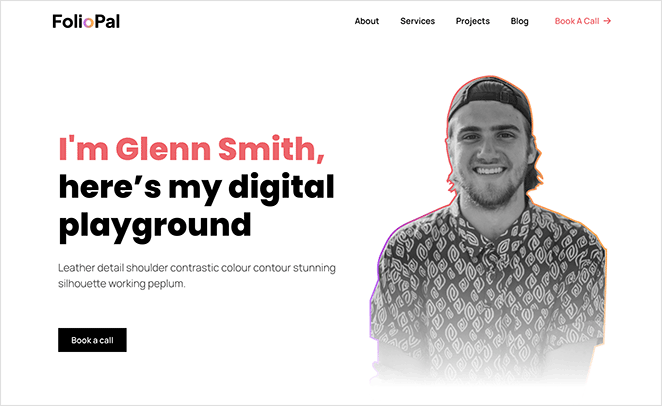
SeedProd no es un tema de portafolio tradicional. Es un constructor de sitios web de WordPress de arrastrar y soltar que te permite diseñar un diseño de portafolio personalizado sin tocar código.
A diferencia de los temas preconstruidos, tú controlas cada sección del diseño. Esto incluye la cabecera, el pie de página, las páginas de proyectos individuales y cualquier diseño personalizado intermedio.
Uso SeedProd en mis propios sitios, y la velocidad fue lo primero que noté en uso real. En mis pruebas de GTmetrix, SeedProd cargó en 556 ms con solo 16 solicitudes HTTP.
Comencé con el kit de plantillas de portafolio de fotografía y tuve una estructura de trabajo en menos de 20 minutos. El editor me dio control sobre cada sección sin luchar contra diseños predefinidos.
La contrapartida honesta: no hay versión gratuita para la creación de temas, y la configuración funciona de manera diferente a la instalación de un tema estándar de WordPress. Si quieres activar un tema y terminar, un tema preconstruido tradicional es el camino más sencillo.
| Pros | Contras |
|---|---|
| Tiempo de carga de 556 ms en pruebas de GTmetrix | Se requiere suscripción de pago a partir de 79,50 $/año |
| Más de 150 kits de plantillas de portafolio | Configuración más compleja que los temas preconstruidos |
| Control total del diseño sin código | No ideal para una experiencia tradicional de instalar y listo |
| Más de 1 millón de usuarios, sólido equipo de soporte | |
| Crea temas completos y personalizados, no solo páginas |
Veredicto: SeedProd es mi mejor opción para creativos que desean un portafolio que no se parezca en nada a un tema estándar de WordPress. La configuración requiere más esfuerzo inicial, pero obtienes control total sobre el resultado.
2. Astra: Mejor para la flexibilidad de velocidad y Page Builder
| Característica | Detalles |
|---|---|
| Precios | Gratis / Pro desde 59 €/año |
| Plan gratuito | Sí |
| Características destacadas | • Funciona con Elementor, Beaver Builder y Gutenberg • Tema base ligero con un mínimo de sobrecarga • Amplia biblioteca de plantillas de inicio |
| Valoración | A+ |
| Mejor para | Creativos que ya utilizan un page builder y desean una base rápida y neutral |
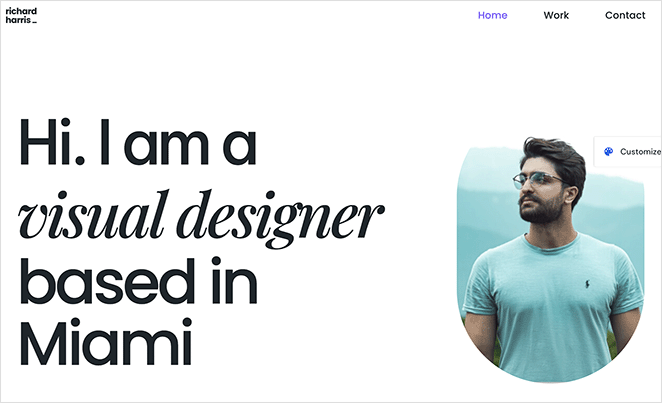
Astra es un tema ligero para WordPress con más de 1 millón de instalaciones activas. Se combina con el page builder de su elección y apenas añade sobrecarga por sí mismo.
Mi prueba fue un escenario de cliente: un diseñador gráfico que necesitaba un portafolio de cuadrícula de carga rápida en un hosting compartido. Combiné Astra con el editor de Gutenberg y tuve un sitio funcionando en aproximadamente una hora usando una plantilla de inicio.
Encontré que la versión gratuita era suficiente para uso de portafolio sin necesidad de la actualización Pro. El tema base de Astra apenas añade sobrecarga, lo que importa cuando tu sección principal carga varias imágenes grandes.
El inconveniente es que Astra no incluye tipos de publicación de portafolio ni filtrado de forma nativa. Los añades a través de un page builder o un plugin de portafolio independiente.
| Pros | Contras |
|---|---|
| Tema base genuinamente ligero | Tipo de publicación de portafolio o filtrado no incluido |
| Funciona de forma nativa con Elementor, Beaver Builder y Gutenberg | Necesita un page builder para una flexibilidad de diseño real |
| La versión gratuita es funcional sin limitaciones | Algunas plantillas avanzadas requieren la actualización Pro |
| Amplia biblioteca de plantillas de inicio |
Veredicto: Astra es la elección correcta si ya utilizas un page builder y deseas una base rápida y neutral sobre la que construir. La versión gratuita maneja portafolios básicos; actualiza cuando necesites tipografía avanzada o controles de diseño personalizados.
3. Neve: Mejor para portafolios minimalistas de carga rápida
| Característica | Detalles |
|---|---|
| Precios | Gratis / Pro desde 69 €/año |
| Plan gratuito | Sí |
| Características destacadas | • Tamaño del tema base inferior a 50 KB • Importación de sitios de inicio con un solo clic • Soporte nativo para todos los principales page builders |
| Valoración | A |
| Mejor para | Principiantes que desean un portafolio rápido y limpio sin una configuración complicada |
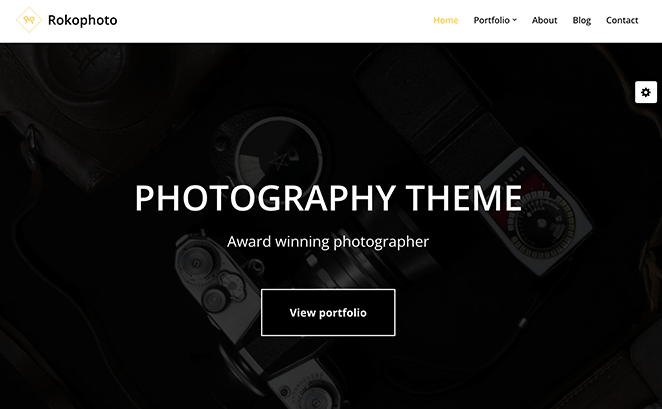
Neve es un tema ligero para WordPress de ThemeIsle construido en torno a la velocidad y la simplicidad. Funciona de forma nativa con Gutenberg, Elementor, Beaver Builder y Brizy.
El caso de uso en el que profundicé más fue el tiempo de configuración desde una instalación limpia de WordPress. La importación de sitios de inicio con un clic de Neve funcionó sin problemas de compatibilidad, y tuve una demostración de portafolio lista en minutos.
También me centré en la representación en dispositivos móviles, porque las imágenes del portafolio impactan mucho en pantallas más pequeñas. Neve lo manejó limpiamente sin ningún trabajo de optimización adicional por mi parte.
| Pros | Contras |
|---|---|
| Uno de los tamaños base de tema más pequeños disponibles | La versión gratuita tiene opciones de estilo limitadas |
| La importación de sitios de inicio funciona de manera fiable | Necesita un page builder para un control de diseño completo |
| La versión gratuita soporta todos los principales page builders | Menos específico para fotografía que Inspiro Pro |
| Representación móvil fluida de forma nativa |
Veredicto: Neve es la mejor opción gratuita y minimalista para portafolios que no necesitan características específicas de fotografía. La versión gratuita es suficiente para lanzar; actualiza cuando necesites diseños de encabezado y pie de página personalizados.
4. OceanWP: Mejor para portafolios económicos con comercio electrónico
| Característica | Detalles |
|---|---|
| Precios | Gratis / Pro desde 69 €/año |
| Plan gratuito | Sí |
| Características destacadas | • Extensión de portafolio con filtrado y lightbox • Sólida integración con WooCommerce • Diseños adaptables con soporte para ventanas emergentes |
| Valoración | A |
| Mejor para | Creativos que venden su trabajo directamente desde su portafolio |
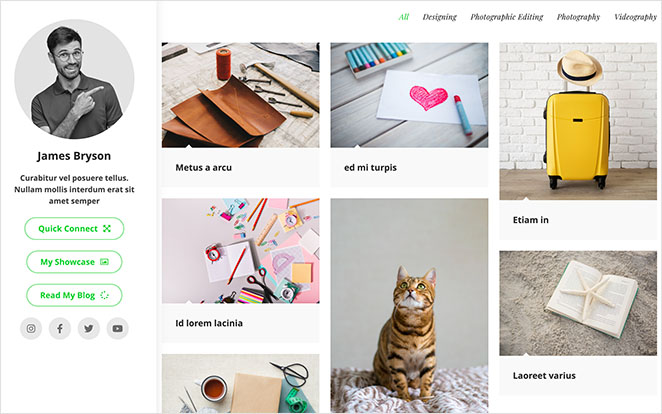
OceanWP es un tema gratuito de WordPress con un sólido soporte para WooCommerce y una extensión de portafolio opcional. Es una buena opción para creativos que necesitan una tienda y un portafolio en el mismo sitio.
Probé OceanWP frente a Neve para un cliente que necesitaba vender impresiones directamente desde su portafolio. La integración con WooCommerce gestionó la configuración de tienda más portafolio sin apilar plugins adicionales.
Encontré que el tema base gratuito era sólido para diseños básicos. Las funciones específicas del portafolio (lightbox, filtrado de proyectos) están detrás de extensiones de pago, así que presupuesta esas si necesitas el conjunto completo de funciones.
| Pros | Contras |
|---|---|
| Sólida integración con WooCommerce para vender trabajos | El filtrado y lightbox del portafolio requieren extensiones de pago |
| La extensión de portafolio añade filtrado y lightbox | Las extensiones pueden aumentar el coste |
| La versión gratuita es utilizable para diseños básicos | Instalación predeterminada más pesada que Neve o Astra |
| Mantenido activamente con actualizaciones regulares |
Veredicto: OceanWP tiene más sentido si vendes tu trabajo directamente desde tu sitio de portafolio. Presupuesta las extensiones si quieres filtrado y lightbox; el tema base gratuito por sí solo no te dará un conjunto completo de funciones de portafolio. Si tu objetivo principal es la tienda en sí, consulta nuestro resumen de los mejores temas de WordPress para eCommerce.
5. Divi: El mejor para diseño visual todo en uno
| Característica | Detalles |
|---|---|
| Precios | 89 €/año o 249 € de por vida |
| Plan gratuito | No |
| Características destacadas | • Constructor visual de arrastrar y soltar incluido • Más de 200 paquetes de diseño que incluyen diseños de portafolio • Controles de diseño globales y pruebas A/B |
| Valoración | A |
| Mejor para | Diseñadores que crean múltiples sitios y quieren una herramienta para todo |
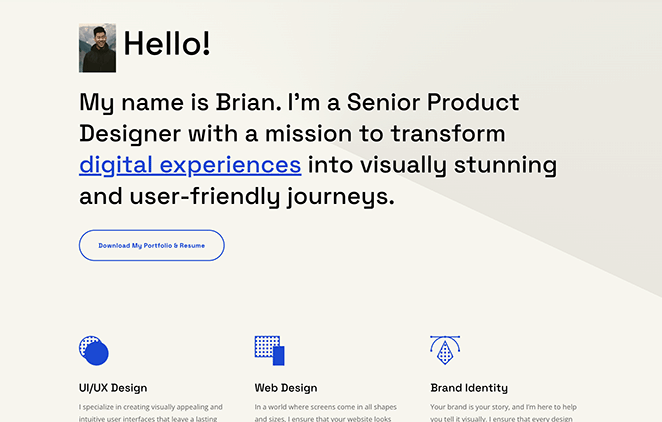
Divi es un tema de WordPress y un constructor visual de páginas de Elegant Themes combinados en un solo producto. Obtienes una herramienta de diseño completa sin necesidad de un plugin constructor de páginas independiente.
Profundicé en Divi para un portafolio de varias secciones con páginas de estudios de caso de proyectos y una sección de equipo. Todo estaba en un solo producto: el tema, el constructor y los controles de diseño globales.
Medí el uso de recursos de Divi con Query Monitor: 13,0 MB de memoria y 86 consultas a la base de datos por página. SeedProd usó 4,3 MB y 34 consultas en el mismo entorno de prueba, por lo que la diferencia de sobrecarga es real en alojamiento compartido.
La comunidad y la documentación son extensas. Encontrar respuestas a preguntas de configuración fue más rápido con Divi que con opciones de temas más pequeñas.
| Pros | Contras |
|---|---|
| Tema y constructor de páginas en un solo producto | 13,0 MB de memoria y 86 consultas a la base de datos por página |
| Más de 200 paquetes de diseño que incluyen diseños de portafolio | Sin versión gratuita |
| Opción de precio de por vida a 249 $ | Te encierra en el ecosistema Divi |
| Comunidad y documentación amplias y activas | Mayor uso de recursos en alojamiento compartido |
Veredicto: Divi vale la inversión si estás creando múltiples sitios y quieres una herramienta consistente para todos ellos. El uso de recursos es mayor que en opciones más ligeras, por lo que funciona mejor en alojamiento gestionado o dedicado.
6. Ultra: El mejor para diseños audaces y poco convencionales
| Característica | Detalles |
|---|---|
| Precios | Desde 59 |
| Plan gratuito | No |
| Características destacadas | • Constructor Themify incluido • Más de 60 diseños de portafolio prediseñados • Opciones avanzadas de estilo de filas y columnas |
| Valoración | B+ |
| Mejor para | Diseñadores que desean un aspecto creativo sin Elementor o Beaver Builder |
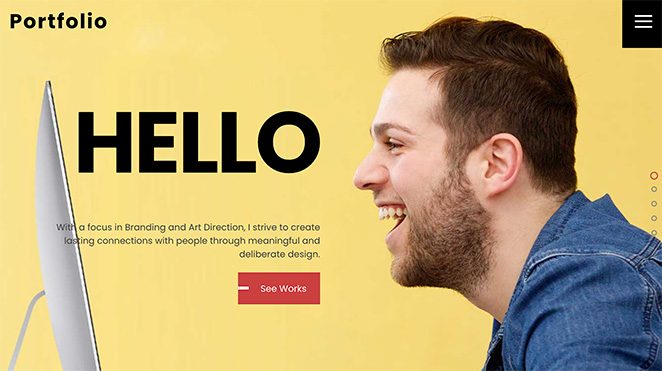
Ultra es un tema premium de WordPress de Themify que incluye el Constructor Themify. Está diseñado para creativos que desean diseños que se destaquen de las cuadrículas estándar de WordPress.
Construí una página de portafolio en Ultra para ver cómo el constructor Themify manejaba secciones con muchas imágenes. Las demostraciones prediseñadas son realmente distintivas; las opciones de diseño se ven diferentes a Astra o Neve de fábrica.
Lograr que el diseño coincidiera con mi visión llevó más tiempo que con los temas compatibles con constructores de páginas. Encontré que la resolución de problemas era más lenta de lo esperado porque el constructor Themify tiene menos tutoriales y recursos comunitarios que Elementor.
| Pros | Contras |
|---|---|
| Diseños de portafolio creativos prediseñados | El constructor Themify tiene menos tutoriales que Elementor |
| Constructor incluido, no se necesita un plugin separado | Curva de aprendizaje más alta que los temas compatibles con constructores de páginas |
| Opción de precio único disponible | Comunidad más pequeña que Astra o Divi |
| Diseño adaptable con controles de diseño avanzados |
Veredicto: Ultra se adapta a diseñadores que desean un aspecto poco convencional y no les importa una curva de configuración más pronunciada. Si te sientes cómodo aprendiendo un constructor menos documentado, las opciones de diseño son genuinamente diferentes a cualquier otra en esta lista.
7. Hestia Pro: Mejor para configuración rápida de portafolios de una página
| Característica | Detalles |
|---|---|
| Precios | Gratis + Pro |
| Plan gratuito | Sí (Hestia en WordPress.org) |
| Características destacadas | • Diseño de sección de una página • Estilo Material Design de fábrica • Soporte WooCommerce |
| Valoración | B+ |
| Mejor para | Autónomos que necesitan un portafolio simple de una página rápidamente |
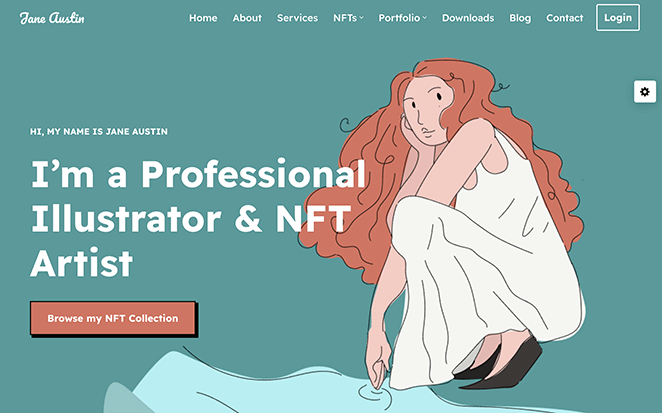
Hestia Pro es un tema de WordPress de una página de ThemeIsle. La versión gratuita, Hestia, tiene más de 100.000 instalaciones activas en WordPress.org y funciona bien como punto de partida.
Probé Hestia para un escenario común de autónomos: un portafolio de una sola página que cubre muestras de trabajo, servicios y una sección de contacto en un solo desplazamiento. El diseño se adapta bien a esto sin configuración adicional.
Encontré que la versión gratuita en WordPress.org es más capaz de lo que sugiere su número de instalaciones. Los visitantes ven tu trabajo, tu experiencia y cómo contratarte sin tener que navegar a páginas separadas.
| Pros | Contras |
|---|---|
| Versión gratuita en WordPress.org con más de 100.000 instalaciones | El formato de una página limita cómo muestras muchos proyectos |
| El diseño de una página se adapta a portafolios creativos simples | Precio Pro a través de paquetes de ThemeIsle (verificar antes de comprar) |
| Estilo profesional Material Design | Menos flexible que Neve para portafolios de varias páginas |
| Rápido de configurar para usuarios primerizos |
Veredicto: Hestia Pro funciona si tu portafolio es simple: un puñado de proyectos destacados, una breve biografía y un formulario de contacto. No escala bien a páginas de estudios de casos de proyectos profundos.
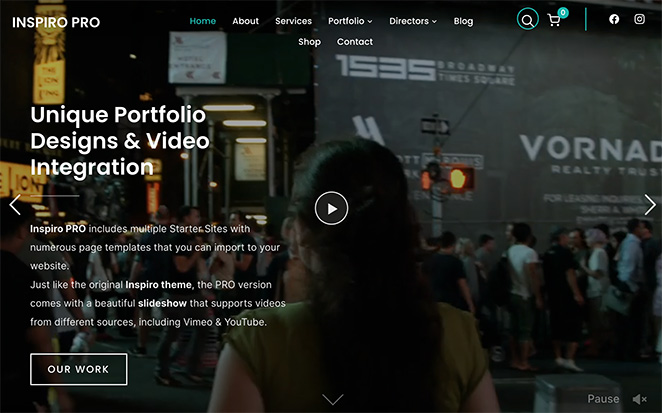
8. Inspiro Pro: Mejor para portafolios de fotografía
| Característica | Detalles |
|---|---|
| Precios | 69 $/año (WPZoom) |
| Plan gratuito | Sí (Inspiro en WordPress.org) |
| Características destacadas | • Páginas de proyecto a pantalla completa y fondos de vídeo • Filtrado de categorías incorporado • Más de 45 sitios de inicio en nichos de fotografía y creativos |
| Valoración | B+ |
| Mejor para | Fotógrafos que desean un tema diseñado específicamente sin tener que empezar desde cero |
Inspiro Pro es un tema de WordPress centrado en la fotografía de WPZoom. Incluye diseños de imágenes a pantalla completa, filtrado de proyectos y compatibilidad con fondos de vídeo como características principales. Si también necesita un plugin de galería independiente, consulte nuestra lista de los mejores plugins de galería de fotos para WordPress.
Configuré una prueba de portafolio de fotografía con más de 50 imágenes en 6 categorías. El diseño de cuadrícula y el filtrado funcionaron de manera impecable, y las páginas de proyecto a pantalla completa dieron espacio a las imágenes sin necesidad de CSS adicional.
Empecé con la versión gratuita de Inspiro en WordPress.org antes de actualizar. Los fondos de vídeo y los diseños a pantalla completa son características exclusivas de Pro, que es donde los 69 $ / año justifican su coste para los fotógrafos.
| Pros | Contras |
|---|---|
| Diseñado específicamente para portafolios visuales | Más centrado en la fotografía que en portafolios de diseño o UX |
| Las páginas de proyecto a pantalla completa muestran las imágenes de forma limpia | Las funciones completas requieren la actualización a Pro |
| Filtrado de portafolio incorporado | Menos flexible para diseños no estándar |
| Más de 45 sitios de inicio para una configuración rápida |
Veredicto: Inspiro Pro es la opción más clara para los fotógrafos que desean un tema diseñado específicamente sin tener que empezar desde cero. Las funciones Pro merecen la actualización si la fotografía es su principal actividad.
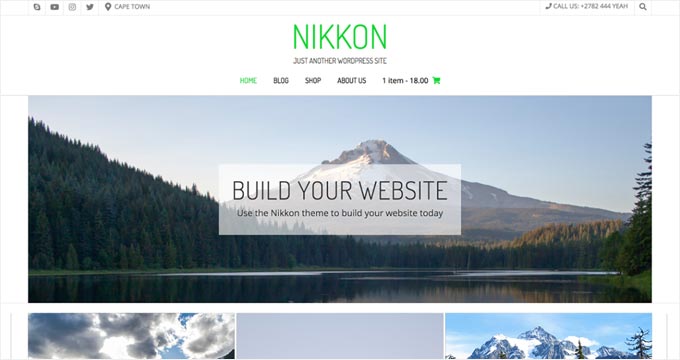
9. Nikkon: El mejor tema gratuito multipropósito para portafolios
| Característica | Detalles |
|---|---|
| Precios | Gratis |
| Plan gratuito | Sí |
| Características destacadas | • Funciona con el Personalizador de WordPress • Compatible con WooCommerce • Diseño limpio y minimalista para múltiples tipos creativos |
| Valoración | B |
| Mejor para | Principiantes que desean un punto de partida gratuito sin configuración adicional |
Nikkon es un tema gratuito de WordPress con un diseño limpio y minimalista que funciona para múltiples tipos creativos. Utiliza el Personalizador de WordPress estándar para la configuración.
Instalé Nikkon en un sitio de WordPress nuevo para ver hasta dónde puede llegar la versión gratuita para un principiante. Las opciones del Personalizador cubren colores, fuentes y una imagen destacada sin tocar código.
Nikkon no tiene tipos de publicación de portafolio incorporados, así que utilicé bloques de Gutenberg para mostrar las páginas de proyecto. Para el primer sitio de un principiante, eso es manejable; simplemente no espere un filtrado incorporado.
| Pros | Contras |
|---|---|
| Gratuito sin nivel de pago | Tipo de publicación de portafolio o filtrado no incluido |
| Diseño limpio y minimalista para múltiples tipos creativos | Personalización muy básica en comparación con temas premium |
| Compatible con WooCommerce | Opciones de diseño de página limitadas |
| Funciona con bloques de Gutenberg |
Veredicto: Nikkon funciona para un principiante que necesita un punto de partida gratuito sin pagar por un tema premium de inmediato. Pase a una opción más capaz cuando aumente el número de sus proyectos o necesite filtrado de portafolio.
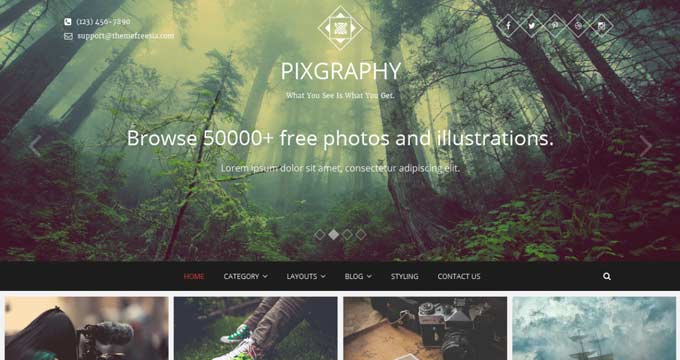
10. Pixgraphy: El mejor tema gratuito para portafolios de fotografía
| Característica | Detalles |
|---|---|
| Precios | Gratis |
| Plan gratuito | Sí |
| Características destacadas | • Galería y lightbox incorporados • Diseños optimizados para fotografía • Compatible con Contact Form 7 |
| Valoración | B |
| Mejor para | Fotógrafos que desean una galería y lightbox sin plugins adicionales |
Pixgraphy es un tema gratuito de WordPress diseñado para portafolios de fotografía. Incluye visualización de galerías y funcionalidad de lightbox sin necesidad de un plugin adicional.
Instalé Pixgraphy para compararlo con Nikkon en el mismo conjunto de imágenes de portafolio. La galería y el lightbox funcionaron sin plugins adicionales, lo cual es una ventaja real para un tema gratuito.
La limitación es la personalización. Estás trabajando dentro de un diseño fijo, y cambiar fuentes o colores requiere CSS o un tema hijo.
| Pros | Contras |
|---|---|
| Gratis con lightbox integrado | Personalización muy limitada sin CSS |
| Diseños de galería optimizados para fotografía | Opciones de diseño fijo |
| Diseño limpio que mantiene el foco en las imágenes | Sin filtrado de tipo de publicación de portafolio |
| Compatible con Contact Form 7 |
Veredicto: Pixgraphy es la mejor opción gratuita si eres un fotógrafo que desea una galería funcional sin plugins adicionales. Combínalo con un plugin de formulario de contacto y tendrás todo lo que necesitas para empezar.
Preguntas Frecuentes
¿Puedo crear un portafolio de WordPress sin un tema de portafolio especial?
Sí. Cualquier tema de WordPress que admita un constructor de páginas puede mostrar contenido de estilo portafolio. Los temas de portafolio dedicados incluyen tipos de publicación de proyectos, filtrado de imágenes y soporte de lightbox integrados, por lo que no necesitas configurar esas funciones por separado.
¿Qué temas de portafolio de WordPress tienen una versión gratuita?
Astra, Neve, OceanWP, Hestia, Inspiro (básico), Nikkon y Pixgraphy tienen versiones gratuitas en WordPress.org. Las versiones gratuitas son utilizables, aunque algunas funciones como el filtrado por categoría o los diseños de pantalla completa pueden requerir la actualización de pago.
¿Cuánto cuesta un tema de portafolio de WordPress?
Existen opciones gratuitas que funcionan bien para portafolios básicos. Los temas de portafolio premium comienzan entre $59 y $89 al año. SeedProd, que te da control total del diseño con un constructor de arrastrar y soltar, comienza en $79.50 al año.
¿Es Astra un buen tema para un portafolio de fotografía?
Astra funciona bien para fotografía cuando se combina con Elementor o Beaver Builder. El tema base es rápido, pero no incluye tipos de publicación de portafolio ni filtrado integrados. Para funciones específicas de fotografía sin un constructor de páginas, Inspiro Pro es la mejor opción.
¿Qué tema de portafolio de WordPress es el adecuado para ti?
El tema adecuado depende de lo que estés mostrando y de cuánto control quieras sobre el diseño.
Empezando desde cero sin presupuesto: Neve o Astra tienen versiones gratuitas que funcionan para portafolios sencillos. Combina cualquiera de ellos con el editor de Gutenberg y podrás lanzar sin gastar nada.
Quieres un portafolio que parezca completamente personalizado: SeedProd te permite diseñar cada sección desde cero sin contratar a un desarrollador. La configuración lleva más tiempo, pero el resultado no se parece en nada a un tema predeterminado de WordPress.
La mayoría de los temas aquí tienen versiones gratuitas o demostraciones en vivo. Instala el que se ajuste a tu situación, añade tus páginas de proyectos reales y pruébalo con contenido real antes de comprometerte con un plan de pago.
También puedes encontrar útiles estas guías:
- Cómo crear un tema personalizado de WordPress sin código
- Cómo cambiar el tema de WordPress sin perder contenido
- ¿Cuánto cuesta un tema personalizado de WordPress?
- Los mejores temas multipropósito de WordPress (gratuitos y de pago)
- Los mejores temas de WordPress para blogs para bloggers y escritores
¡Gracias por leer! Nos encantaría conocer tu opinión, así que únete a la conversación en YouTube, X y Facebook para obtener más consejos y contenido útil para hacer crecer tu negocio.




