
ActiveCampaign es una plataforma de marketing por correo electrónico que te permite gestionar campañas de correo electrónico y hacer crecer tu lista de suscriptores. Esta guía te muestra cómo conectar ActiveCampaign al bloque Formulario de suscripción de SeedProd para que los nuevos suscriptores se agreguen automáticamente a tu cuenta de ActiveCampaign.
Paso 1: Abrir la Página de Conexión
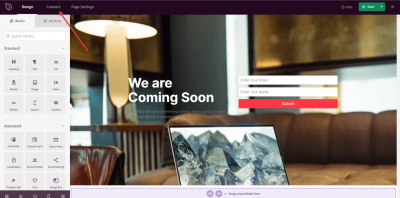
En tu administrador de WordPress, ve al Panel de Control de SeedProd y haz clic en Conectar.
Paso 2: Seleccionar ActiveCampaign
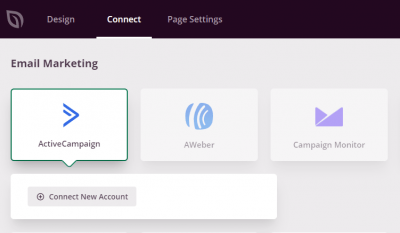
De la lista de integraciones de correo electrónico disponibles, selecciona ActiveCampaign y haz clic en Conectar Nueva Cuenta.
Paso 3: Abrir tu cuenta de ActiveCampaign
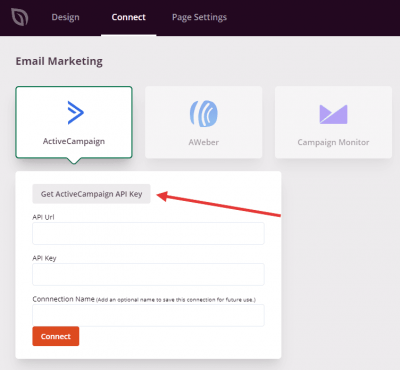
Haz clic en el botón Obtener clave API de ActiveCampaign para abrir tu cuenta de ActiveCampaign. Recuperarás tus credenciales de allí en el siguiente paso.
Paso 4: Buscar tu URL y clave API
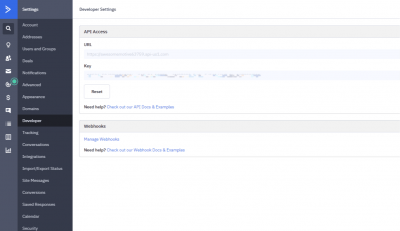
En tu cuenta de ActiveCampaign, ve a Mi Cuenta > Configuración > Desarrollador. Copia tu URL API y Clave API de esta página.
Paso 5: Conectar tu cuenta
De vuelta en SeedProd, pega tu URL API y Clave API en los campos correspondientes y haz clic en Conectar.
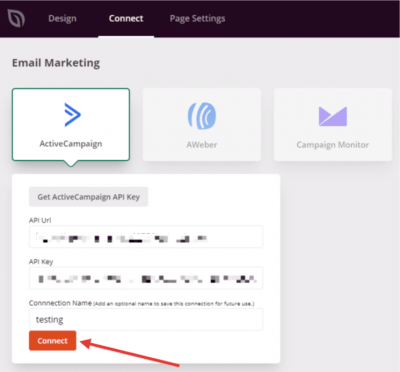
ActiveCampaign ahora está conectado a SeedProd. Puedes seleccionar tu lista de ActiveCampaign en la configuración del bloque Formulario de suscripción para que los suscriptores se agreguen automáticamente cuando los visitantes envíen el formulario en tu página.