
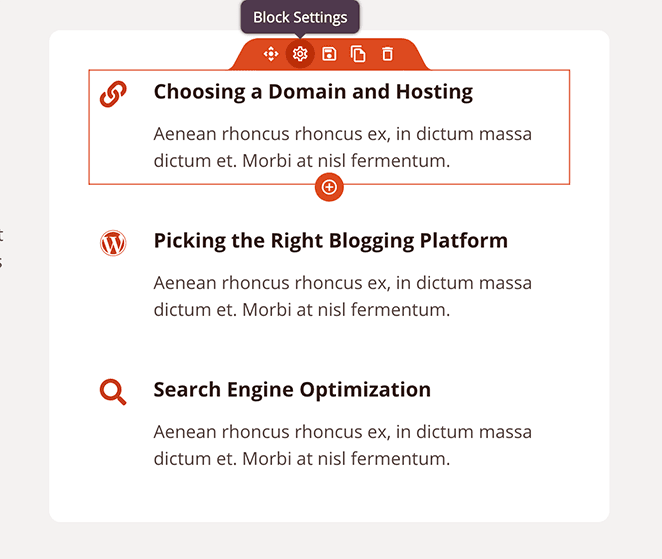
Der Icon Box Block ermöglicht es Ihnen, ein Font Awesome-Icon mit einer Überschrift und beschreibendem Text in einem einzigen, einheitlichen Layout zu kombinieren. Dieser Block ist ideal, um Funktionen, Vorteile, Dienstleistungen oder beliebige Inhalte hervorzuheben, die von einem visuellen Symbol in Verbindung mit einer kurzen Erklärung profitieren.
Mit voller Kontrolle über Icon-Größe, Farbe, Ausrichtung, Abstände und Typografie ist der Icon Box Block einer der vielseitigsten Blöcke für den Aufbau von Funktionsbereichen und Wertversprechen-Layouts.
Hinzufügen des Icon Box Blocks zu Ihren Seiten
Befolgen Sie diese Schritte, um einen Icon Box Block zu Ihrer SeedProd-Seite hinzuzufügen:
Schritt 1: Block hinzufügen
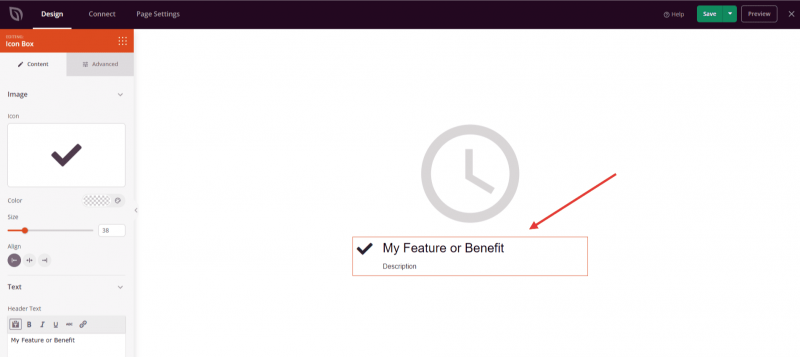
Ziehen Sie unter Design > Blöcke den Icon Box Block per Drag & Drop in den gewünschten Bereich Ihrer Seite.
Schritt 2: Inhaltseinstellungen konfigurieren
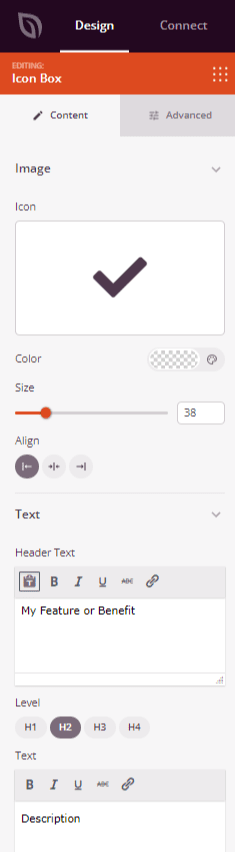
Nach dem Hinzufügen klicken Sie auf den Icon Box Block, um seine Einstellungen zu öffnen. Der Tab Inhalt ist in zwei Abschnitte unterteilt: Icon/Bild und Text.
Symbol:
- Icon: Klicken Sie auf den Icon-Picker, um aus Tausenden von verfügbaren Font Awesome-Icons zu suchen und auszuwählen.
- Farbe: Legen Sie die Farbe des Icons mit dem Farbwähler fest.
- Größe: Legen Sie die Größe des Icons von 10 bis 150 Pixel mit dem Schieberegler fest.
- Icon-Abstand: Legen Sie den Abstand zwischen dem Icon und dem Textinhalt von 10 bis 150 Pixel fest.
- Ausrichtung: Legen Sie die horizontale Ausrichtung des gesamten Icon Box innerhalb seines Bereichs fest – Links, Mitte oder Rechts. Unterstützt gerätespezifische Werte für Desktop, Tablet und Mobilgerät.
- Vertikale Ausrichtung: Legen Sie fest, wie das Icon vertikal relativ zur Überschrift und zum Text ausgerichtet wird – Oben, Mitte oder Unten.
Text:
- Header-Text: Geben Sie die Überschrift für Ihre Icon Box mit dem Rich-Text-Editor ein. Unterstützt Fett-, Kursiv-, Unterstrichen-, Durchgestrichen- und Inline-Links.
- Level: Wählen Sie das HTML-Überschriften-Tag für die Überschrift – H1, H2, H3 oder H4 –, um eine korrekte Dokumentenstruktur beizubehalten.
- Text: Geben Sie den beschreibenden Text für Ihre Icon Box ein. Unterstützt grundlegende Rich-Text-Formatierung, einschließlich Fett-, Kursiv-, Unterstrichen-, Durchgestrichen- und Links.
Schritt 3: Design anpassen
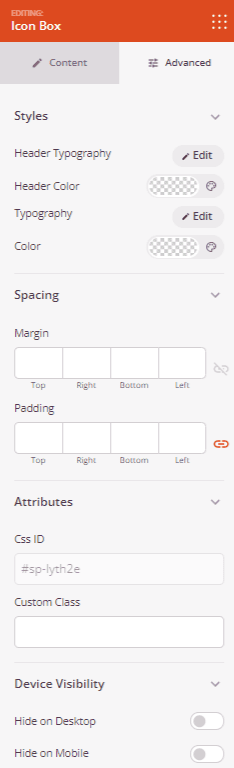
Im Tab Erweitert können Sie die Typografie, Farben und Abstände Ihres Icon Box Blocks anpassen.
Stile:
- Header-Typografie: Passen Sie Schriftfamilie, Schriftstärke, Zeilenhöhe, Buchstabenabstand und Texttransformation der Überschrift an. Unterstützt gerätespezifische Werte für Desktop, Tablet und Mobilgerät.
- Header-Farbe: Legen Sie die Textfarbe der Überschrift mit dem Farbwähler fest.
- Typografie: Passen Sie Schriftfamilie, Schriftstärke, Zeilenhöhe, Buchstabenabstand und Texttransformation des Beschreibungstextes an. Unterstützt gerätespezifische Werte für Desktop, Tablet und Mobilgerät.
- Farbe: Legen Sie die Textfarbe der Beschreibung mit dem Farbwähler fest.
Abstand:
- Rand: Steuern Sie den äußeren Abstand um Ihren Icon Box Block (Oben, Rechts, Unten, Links). Unterstützt gerätespezifische Werte für Desktop, Tablet und Mobilgerät.
- Abstand: Passen Sie den Innenabstand Ihres Icon Box-Blocks an (Oben, Rechts, Unten, Links). Unterstützt geräteabhängige Werte für Desktop, Tablet und Mobilgeräte.
Attribute:
- CSS-ID: Zeigt die automatisch generierte eindeutige Kennung für Ihren Icon Box-Block an, die automatisch von SeedProd für benutzerdefiniertes Styling oder JavaScript-Targeting erstellt wurde.
- Benutzerdefinierte Klasse: Fügen Sie benutzerdefinierte CSS-Klassen hinzu, um spezifische Stile aus Ihrem Theme oder benutzerdefinierten CSS anzuwenden.
- Benutzerdefinierte Attribute: Fügen Sie dem Block-Wrapper-Element beliebige HTML-Attribute hinzu. Geben Sie jedes Attribut in einer neuen Zeile im Format ein: attribut-name|wert.
Gerätesichtbarkeit:
- Auf Desktop ausblenden: Blenden Sie den Icon Box-Block auf Desktop-Bildschirmen aus.
- Auf Tablet ausblenden: Blenden Sie den Icon Box-Block auf Tablet-Geräten aus.
- Auf Mobilgeräten ausblenden: Blenden Sie den Icon Box-Block auf Mobilgeräten aus.
Animationseffekte:
- Eingabeanimation: Wählen Sie einen Animationseffekt, der abgespielt wird, wenn der Icon Box-Block in die Ansicht gescrollt wird, wie z. B. Bounce, Fade In, Zoom In, Rotate In und viele mehr.
Schritt 4: Speichern Sie Ihre Änderungen
Nachdem Sie die Konfiguration des Icon Box-Blocks abgeschlossen und sein Erscheinungsbild angepasst haben, stellen Sie sicher, dass Sie Ihre Arbeit speichern.
Sie haben erfolgreich einen Icon Box-Block zu Ihrer Seite hinzugefügt! Icon-Boxen sind eine der effektivsten Möglichkeiten, Funktionen, Vorteile und Dienstleistungen in einem übersichtlichen, visuell ansprechenden Format darzustellen. Experimentieren Sie mit Icon-Auswahl, Überschriftenebenen und Typografieeinstellungen, um Icon-Boxen zu erstellen, die zu Ihrer Marke passen und Ihren Wert klar kommunizieren.