
Mapeo de Dominio te permite apuntar un dominio completamente separado a una página de destino de SeedProd alojada en tu sitio de WordPress. Por ejemplo, tu sitio principal puede ejecutarse en dominio-a.com mientras que una página de destino en la misma instalación de WordPress es accesible en dominio-b.com.
Paso 1: Añadir un Registro DNS en tu Registrador de Dominio
Inicia sesión en el panel de administración del registrador donde compraste el dominio que deseas mapear. Añade un registro A apuntando a la dirección IP del servidor web que aloja tu sitio de WordPress.
Si no estás seguro de la dirección IP de tu servidor, contacta al equipo de soporte de tu proveedor de hosting web; ellos pueden proporcionártela y confirmar que el registro se ha configurado correctamente. Los cambios de DNS pueden tardar hasta 24–48 horas en propagarse.
Paso 2: Añadir el Dominio en tu Panel de Hosting
En el panel de control de tu hosting web, añade el nuevo dominio como un dominio adicional para tu sitio de WordPress. Tu proveedor de hosting puede ayudarte con este paso y confirmar que el dominio apunta correctamente a tu servidor web.
Paso 3: Configurar el Mapeo de Dominio en SeedProd
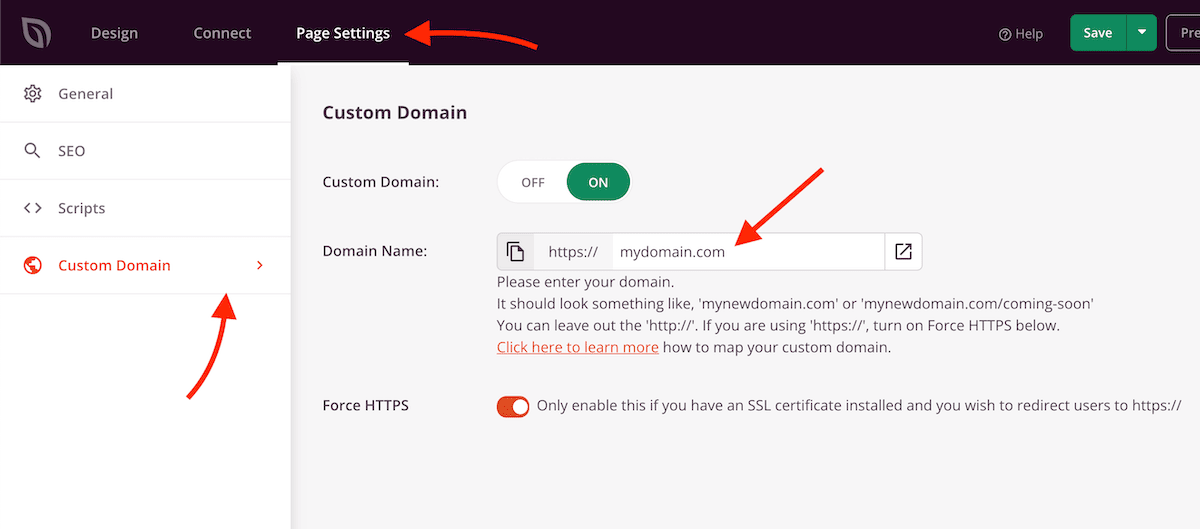
Abre la página de destino que deseas mapear en el constructor de SeedProd y ve a Configuración de Página > Dominio Personalizado. Configura los siguientes ajustes:
- Nombre de Dominio: Introduce el dominio que deseas mapear, por ejemplo
midominio.com. También puedes incluir una ruta opcional, comomidominio.com/gracias, para mapear a una URL de página específica. - Forzar HTTPS: Habilita este interruptor si deseas que el dominio se cargue a través de HTTPS. Esto solo funciona si ya hay un certificado SSL instalado para este dominio.
- Dominio Personalizado: Activa esta opción para habilitar el mapeo de dominio.
Una vez que el mapeo de dominio esté activo, visitar el dominio mapeado mostrará tu página de destino de SeedProd. Si el dominio no se carga de inmediato, dale tiempo a la propagación del DNS para que se complete. Contacta a tu proveedor de hosting si el dominio no se resuelve correctamente después de 48 horas.