
The Animation Effects feature lets you add entrance animations to any block, section, row, or column on your page. When an element with an animation scrolls into the visitor’s viewport, the selected animation plays — adding motion and visual engagement to your design.
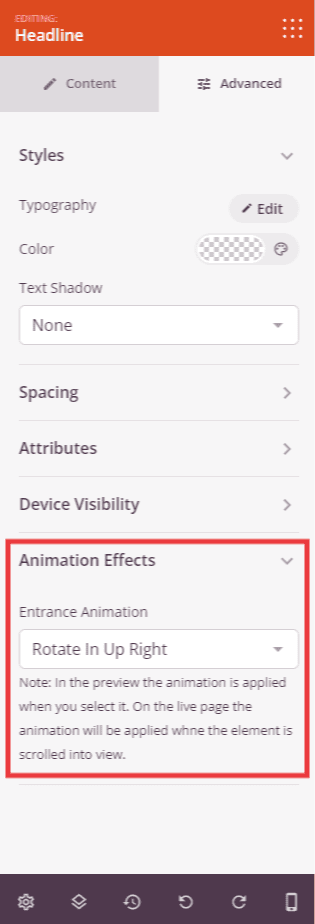
How to Add an Animation
- Click on the block, section, row, or column you want to animate to open its settings panel.
- Click the Advanced tab.
- Expand the Animation Effects section.
- Choose an entrance animation from the dropdown menu.
- Click Save to apply your changes.
Available Animations
SeedProd includes 46 entrance animations organized into the following groups:
Attention Seekers
Bounce, Flash, Pulse, Rubber Band, Shake X, Shake Y, Headshake, Swing, Tada, Wobble, Jello, Heartbeat, Bounce In, Flip, Flip In X, Flip In Y, Light Speed In Left, Light Speed In Right
Back In
Back In Down, Back In Left, Back In Right, Back In Up
Fade In
Fade In, Fade In Down, Fade In Left, Fade In Right, Fade In Up, Fade In Down Big, Fade In Left Big, Fade In Right Big, Fade In Up Big, Fade In Top Left, Fade In Top Right, Fade In Bottom Left, Fade In Bottom Right
Zooming
Zoom In, Zoom In Down, Zoom In Left, Zoom In Right, Zoom In Up
Rotating
Rotate In, Roll In, Rotate In Down Left, Rotate In Down Right, Rotate In Up Left, Rotate In Up Right
Animations can be applied to any element on your page independently — mix different animation types across sections and blocks to create a dynamic, layered feel as visitors scroll through your page.