
ActiveCampaign est une plateforme de marketing par e-mail qui vous permet de gérer vos campagnes d'e-mails et de développer votre liste d'abonnés. Ce guide vous explique comment connecter ActiveCampaign au bloc Formulaire d'inscription de SeedProd afin que les nouveaux abonnés soient automatiquement ajoutés à votre compte ActiveCampaign.
Étape 1 : Ouvrir la page de connexion
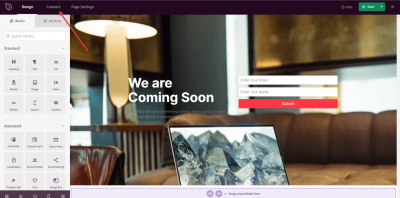
Dans votre administration WordPress, allez au Tableau de bord SeedProd et cliquez sur Connexion.
Étape 2 : Sélectionner ActiveCampaign
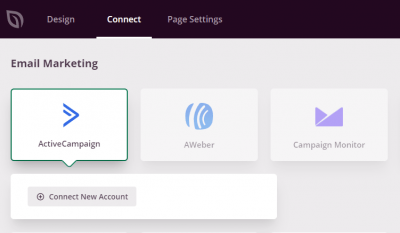
Dans la liste des intégrations d'e-mails disponibles, sélectionnez ActiveCampaign et cliquez sur Connecter un nouveau compte.
Étape 3 : Ouvrir votre compte ActiveCampaign
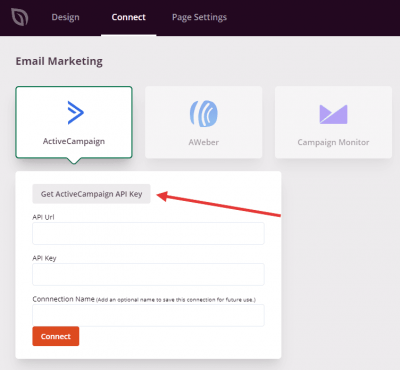
Cliquez sur le bouton Obtenir la clé API ActiveCampaign pour ouvrir votre compte ActiveCampaign. Vous y récupérerez vos identifiants à l'étape suivante.
Étape 4 : Trouver votre URL d'API et votre clé API
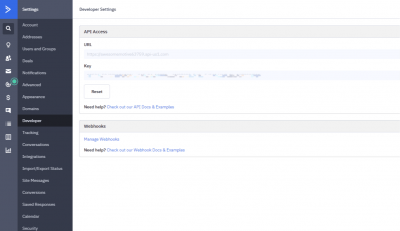
Dans votre compte ActiveCampaign, allez dans Mon compte > Paramètres > Développeur. Copiez votre URL d'API et votre Clé API depuis cette page.
Étape 5 : Connecter votre compte
De retour dans SeedProd, collez votre URL d'API et votre Clé API dans les champs correspondants et cliquez sur Connecter.
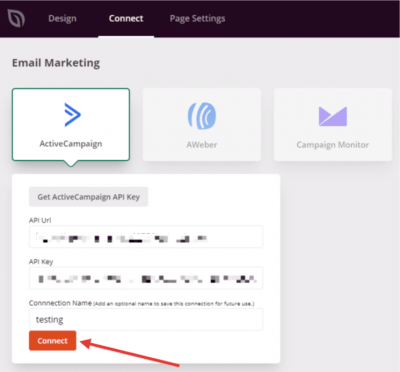
ActiveCampaign est maintenant connecté à SeedProd. Vous pouvez sélectionner votre liste ActiveCampaign dans les paramètres du bloc Formulaire d'inscription afin que les abonnés soient automatiquement ajoutés lorsque les visiteurs soumettent le formulaire sur votre page.